

I am not proud of how long I lived with the cable situation under my desk. For nearly two years, a power strip sat on the floor with six cords fanning out from it like roots. Every time I cleaned, I shoved them back into the corner. I told myself it did not matter because nobody sees under the desk. Except I saw it, every single day, and it quietly bothered me in a way I could never quite name. Clutter is a mood. It seeps into the space even when you are not consciously looking at it.
I tried raceway kits first. The adhesive ones that run along the baseboard. I measured, I cut, I pressed the channels firmly against the wall for a full minute like the directions said. Three of the four sections fell off within a week. Then I tried zip ties looped through a bungee cord and hooked to the back leg of my desk, which worked for about two weeks before the whole thing sagged and looked worse than the bare cables. The Cinati under-desk cable management tray (ASIN B0BPLRX32S) was my third attempt, bought mainly because it was cheap enough that being wrong would not sting. I have now used it on three different desks across eight months. Here is the honest picture.
The Quick Verdict
The best $17 I have spent on my home office. Clamps hold firm, installs in ten minutes, and the tray takes a surprising amount of weight. The only real limitation is tray length on very wide desks.
Amazon Check Today's Price →Still staring at the cable tangle under your desk? Here is the fix.
The Cinati under-desk cable tray clamps on without drilling, holds a full power strip plus your cables, and takes about ten minutes to install. Over 4,000 buyers have put it to work.
Amazon Check Today's Price on Amazon →How I Have Used It
My first test was on a 60-inch IKEA LINNMON in white with the standard 1.25-inch edge thickness. I set the tray up in late September of last year, loaded it with a six-outlet surge protector plus the power cable for my monitor, the USB-C cable for my laptop dock, an Ethernet cable, and my desk lamp cord. That is six separate cables plus the surge protector itself, which weighs just over a pound. The clamp went on with a standard Phillips-head screwdriver, no tools included and none needed beyond that. Total install time: eight minutes, and I am not a fast person with a screwdriver.
In January I moved to a slightly thicker HUANUO electric standing desk with a 1.5-inch edge. The clamp accommodates edges up to about 1.7 inches, so it fit, though a little more tightening was required. In April I tried it on a narrow-edge IKEA MICKE at my painting station, where the desk edge is thinner at just under an inch. On a thin edge the clamp still holds, but I noticed a subtle flex in the tray when I pressed down on it. For a painting station where I am not bumping the desk constantly it is fine. For a standing desk where you are leaning on the edge mid-stretch, I would install two trays side by side for extra support.
The tray itself is 15.7 inches long and roughly 4 inches wide, molded from white ABS plastic with a wire-mesh base that lets you see at a glance what is living in there. There are side hooks on the interior for routing cables in or out rather than bunching them. I use one hook for the surge protector cord and one for the monitor cable, with the rest sitting loose in the tray. Nothing has slipped out in eight months.
Clamp Strength: The Thing People Worry About Most
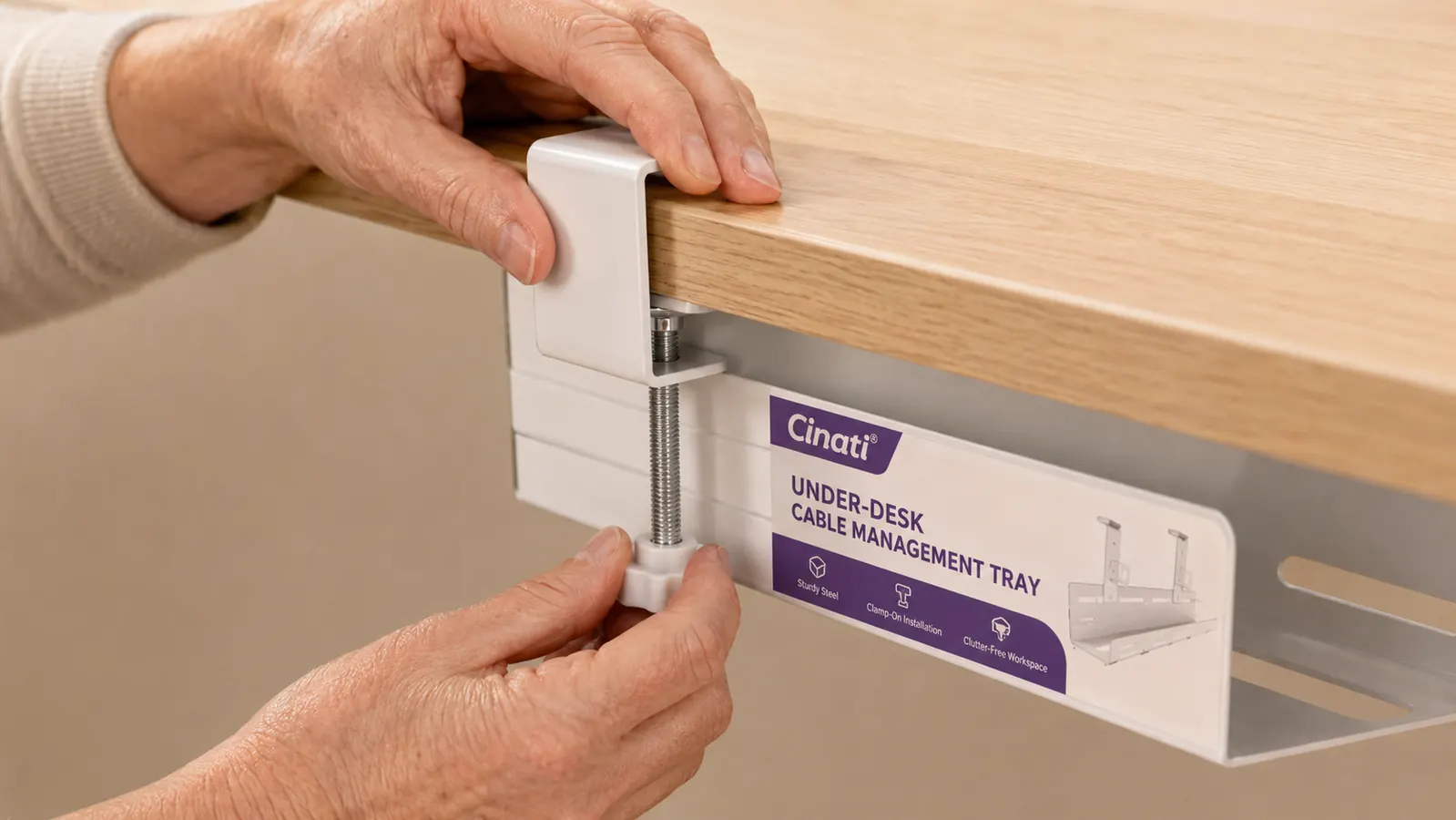
Before buying, I read probably a dozen reviews that worried about one thing above everything else: does the clamp stay put over time, or does the weight slowly pull it loose? I can give you an eight-month answer on the LINNMON. The clamp has not moved a millimeter. I tightened it once on install day and have not touched it since. The surge protector plus all six cables weighs roughly two pounds combined, which is within the tray's stated 11-pound capacity. I have never come close to that limit and I suspect most people will not either.
What the clamp does not like is very smooth laminate on the desk underside. My LINNMON has a smooth white coating, and when I first installed the tray I did not tighten the clamp quite enough, so it slid about half an inch sideways before I retightened. Lesson learned: go firm on the first tighten, not just snug. Once it bites into the edge properly it does not move. On the HUANUO, which has a slightly textured underside panel, the grip was confident from the first turn.
Eight months, two desk moves, and one fully loaded power strip. The clamp has not budged. I forget the tray is even there, which is exactly the point.
What Fits in the Tray
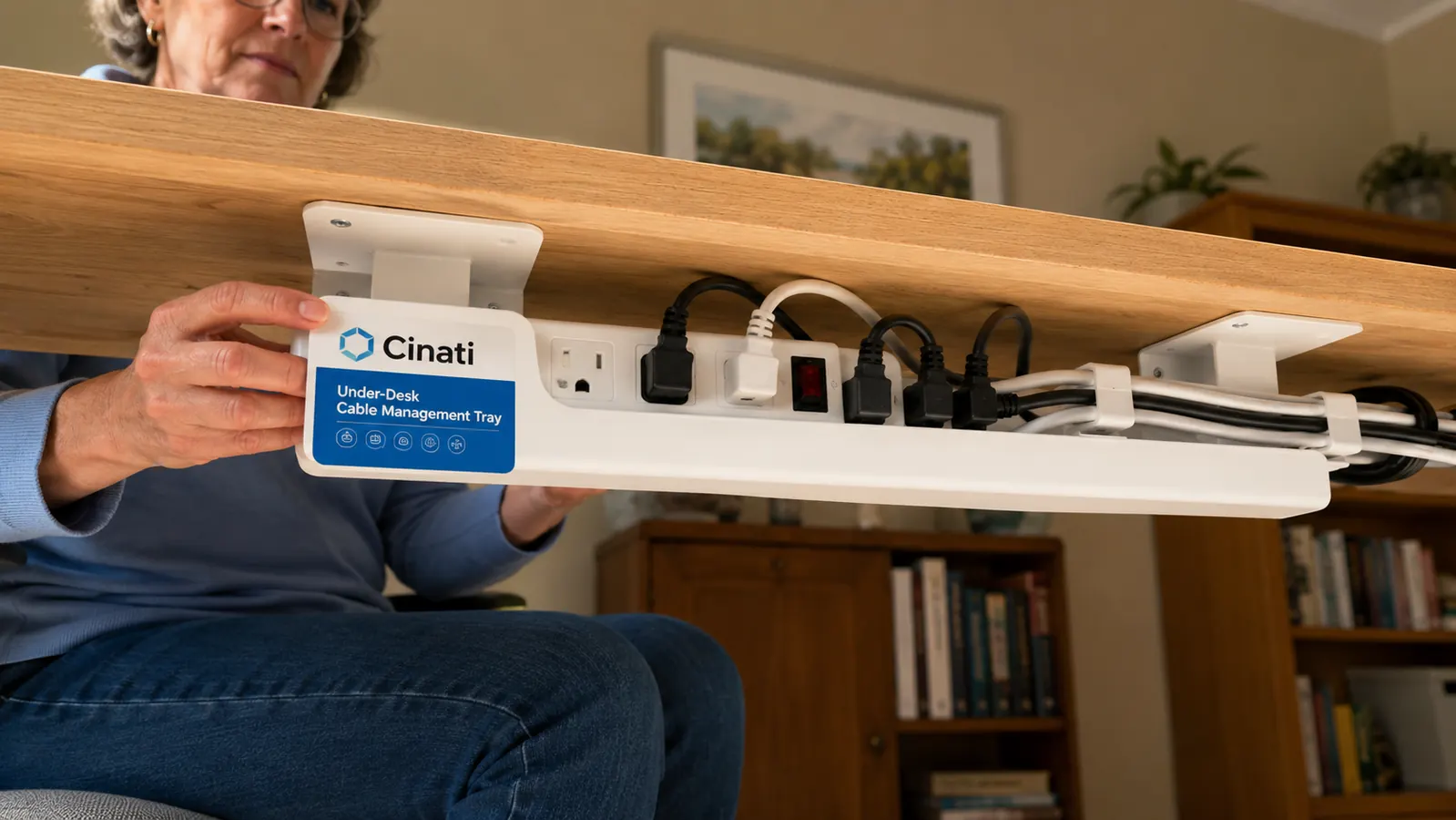
The tray is sized for a standard six-outlet power strip with room to spare. My Belkin BE108230-08, which is 12 inches long and not the slimmest strip on the market, sits in the tray with about 1.5 inches of clearance on either end. I have four power cables and two USB cables also routed through. The wire-mesh base gives a bit of natural grip so nothing slides around when I bump the desk.
Where the capacity does start to feel tight is if you want to include a power brick, like a laptop charger that has a large rectangular block at the midpoint of the cable rather than at the wall plug. Those bricks can hang out of the side or rest uncomfortably on the tray edge. My workaround is to clip the brick itself to the desk leg with a single adhesive cable clip, so only the two thinner cable sections run into the tray. Not a dealbreaker, but it is worth thinking through your cable situation before you install.
Long-Term Build Quality and Finish
The white ABS plastic has stayed white. I was mildly worried about yellowing since ABS is notorious for it, but eight months in with normal indoor light exposure the tray looks the same as the day I installed it. It does collect dust on the interior wire mesh, which you only notice if you crouch under the desk, and wiping it out takes about thirty seconds. The screw mechanism on the clamp has not loosened or shown any sign of stripping.
The plastic does not feel premium in the hand. It is solid but has that budget-product lightness to it. For something that lives entirely out of sight under your desk this is a non-issue. I would rather have a budget piece of functional plastic doing its job invisibly than a premium aluminum version I cannot justify. The aesthetic value of cable management is not in the tray itself. It is in the desk surface you see every morning, which now has nothing snaking across it.
Under-Desk Tray vs. Raceway Kit: Which One to Choose
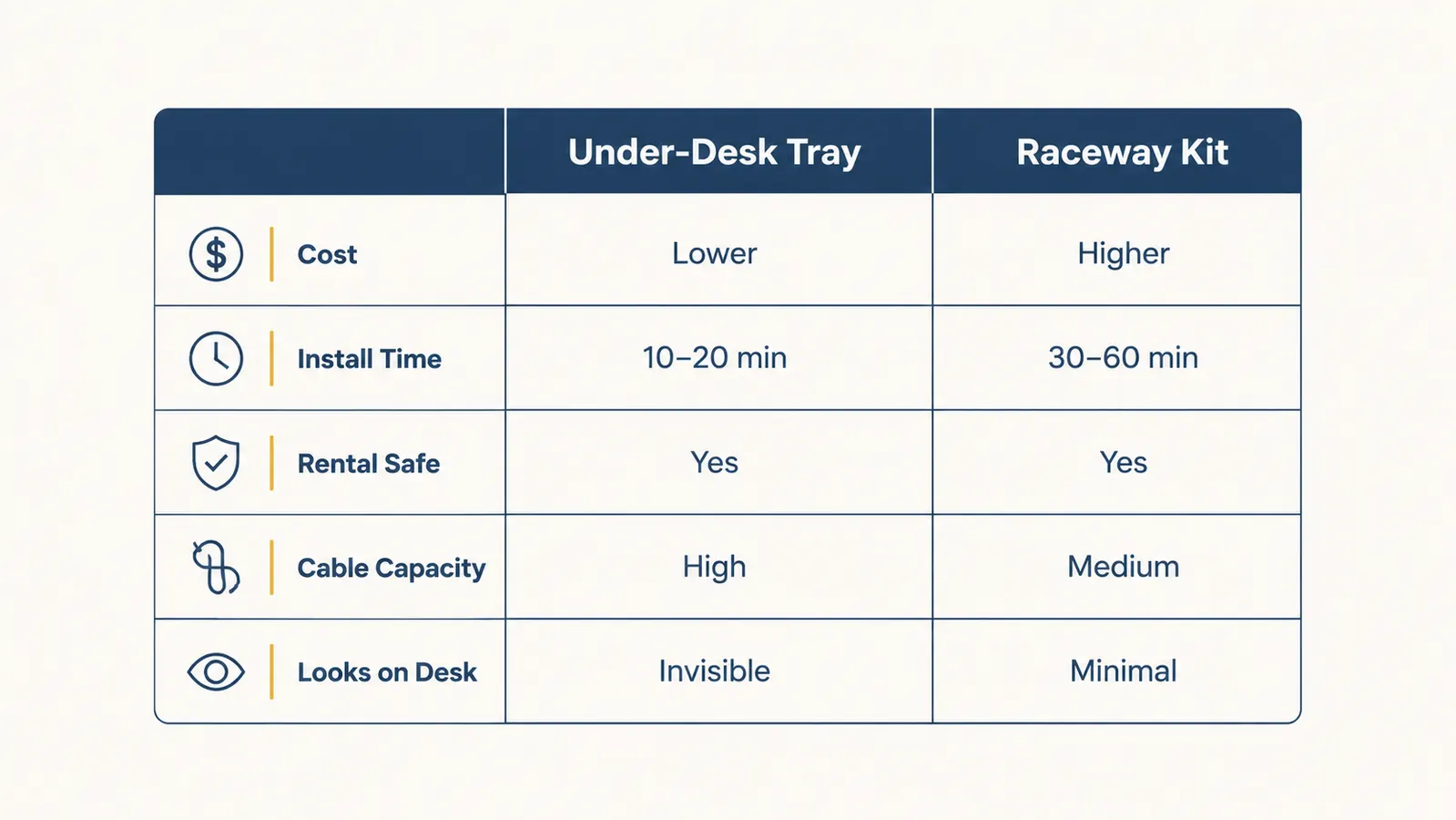
I have used both. A raceway kit runs cables along your baseboard or wall surface, which is useful if you need to get cables from your desk to a wall outlet ten feet away. But raceway kits require the adhesive to bond reliably to your wall, which is a gamble on drywall with textured paint and a near-impossible gamble on tile or brick. They also become a renter's problem at move-out time.
The under-desk tray solves a different problem: the mess directly underneath the desk surface, where the cables from your devices all converge at the power strip. If your outlet is within about three feet of your desk and your cables all naturally gather in that zone, the tray is the better solution. It is faster to install, leaves no marks on walls, and moves with you. If you need to cross a room or reach a far wall outlet, a raceway kit is the right tool. See my full breakdown in the comparison article if you are still deciding.
For most home offices with a standard desk-near-the-outlet setup, the tray wins outright. It is cheaper, faster, and completely reversible. I have linked to a full side-by-side at the bottom of this page if you want to see the detailed comparison.
What I Liked
- Clamp-on installation takes under ten minutes with no drilling and no wall damage
- Holds a full-size power strip plus multiple cables comfortably within the 11-pound limit
- White ABS finish has not yellowed or cracked after eight months of daily use
- Wire-mesh base lets air circulate so the power strip does not overheat
- Moves with you if you rearrange your desk or change rooms
- Genuinely invisible once installed, which is the whole point
Where It Falls Short
- Tray is 15.7 inches long, which may not be wide enough to center on a very large standing desk
- Clamp requires firm initial tightening on super-smooth laminate surfaces to avoid creep
- Large mid-cable power bricks do not sit neatly inside the tray
- Only available in white and black, no wood-finish or gray option for desks with a different palette

Who This Is For
If you have a desk near a wall outlet and your cables collect in a rat's nest between the desk edge and the floor, this tray solves your problem for the cost of a lunch. It is especially good for renters, anyone who rearranges their space regularly, and people who want the visual calm of a clean workspace without spending an afternoon routing cables through wall channels or paying someone to do it. If your desk is near a window and the cable mess is the one thing making the space feel disorganized, this is the fastest fix I have found.
Who Should Skip It
If your desk is far from the outlet and you need cables to travel several feet along a wall, this tray solves only part of the problem. You would still have an exposed run from the desk edge to the outlet. In that case, a raceway kit or a longer cable management spine along the desk leg would serve you better. Likewise, if your desk is thicker than 1.7 inches at the edge, the clamp will not close. Measure your desk edge before ordering.
Ready to look under your desk and not cringe? This is the first step.
The Cinati cable tray is budget-friendly and installs with a screwdriver in about ten minutes. If you are done staring at the cable mess every time you sit down to work, this is where to start.
Amazon Check Today's Price on Amazon →